Hi, I’m Joakim, and welcome to TopGadgetGuide.net. You’ve just picked up one of those awesome mechanical keyboards from Temu, but your setup isn’t complete without a mouse that can keep up. A good gaming mouse makes a massive difference, offering better precision, faster response, and more comfort than a standard office mouse. But diving into Temu for one is overwhelming—thousands of listings, flashy lights, and confusing specs like “DPI”. After analyzing the top-rated models, user reviews, and sensor types, I’ve created this guide to the 5 main types of budget gaming mice on Temu to help you find the perfect one for your grip and your favorite games.
(Want to know how I review my gadgets? Read my full review process here.)
Comparison Table (Top 3 Picks)
| Product Image | Product Name | Best for | Our Rating (out of 5) | Shop Now |
 | The Ultra-Lightweight Mouse | FPS & Fast-Paced Games | 4.7 / 5 |  |
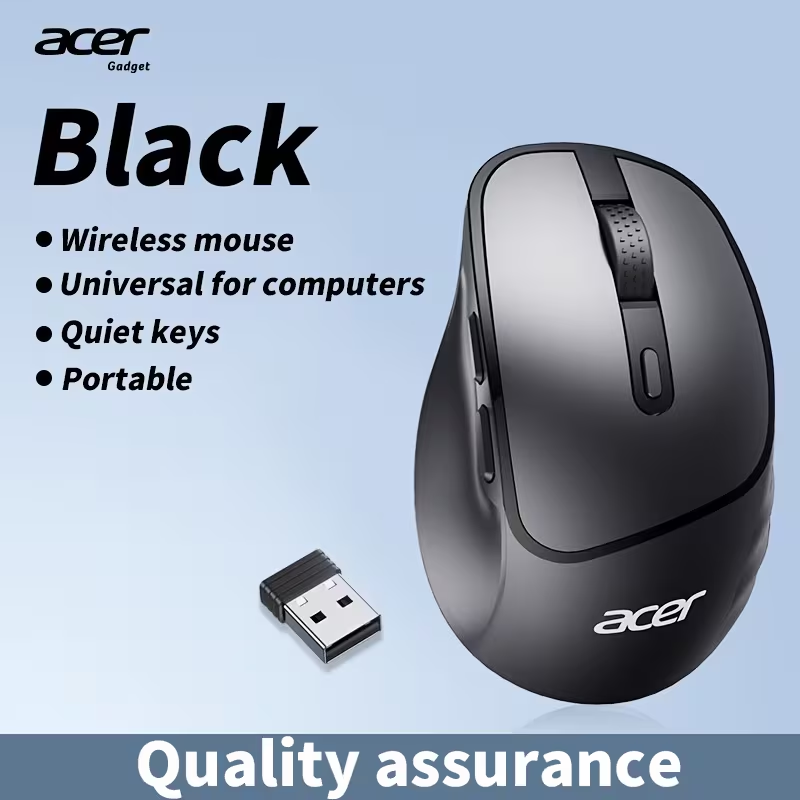 | The Budget Wireless Mouse | Casual, Cord-Free Gaming | 4.5 / 5 | |
 | The Multi-Button “MMO” Mouse | MMOs & Productivity | 4.4 / 5 | |
Detailed Product Reviews
1. The Ultra-Lightweight Mouse
Our Top Pick: Acer Shadow Knight (Solid Shell Edition)

Quick Specs:
- Weight: Lightweight Design (< 80g approx)
- Design: Solid Shell (Easy to clean)
- Sensor: Optical Gaming Sensor (Up to 3200 DPI)
- Best For: FPS & Budget Starters
Description:
This is the perfect entry point for competitive gaming. While many lightweight mice use a “honeycomb” shell with holes to reduce weight, the Acer Shadow Knight achieves a nimble feel with a solid, ergonomic design. This is often preferred by gamers who find the holes on honeycomb mice uncomfortable or distracting. It features dynamic RGB lighting and a precise optical sensor that handles fast “flick” movements significantly better than a standard office mouse.
Pros:
- Solid Shell: Unlike honeycomb mice, this doesn’t trap dirt and dust inside the body, making it much easier to maintain.
- Price-to-Performance: It offers genuine gaming ergonomics and RGB for the price of a coffee.
- DPI Switch: Dedicated button to instantly change sensitivity mid-game.
Cons:
- Wired: You have to deal with a cable.
- Basic Sensor: While good for beginners, it lacks the extreme precision of high-end sensors found in $100 mice.
Why it’s on this list:
This is the best choice for FPS and competitive players on a strict budget. It strips away unnecessary gimmicks to deliver a solid, lightweight aiming experience. To keep the sensor free of dust and debris for maximum precision, we recommend pairing it with one of [The 5 Best Air Dusters on Amazon].

2. The Budget Wireless Mouse
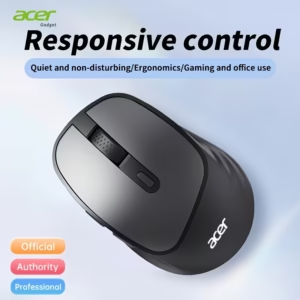
Our Top Pick: Acer Wireless Gaming Mouse (Low Latency Edition)
Quick Specs:
- Connection: 2.4Ghz Wireless (USB Dongle)
- Buttons: 6 Buttons (Including Side Buttons)
- Feature: Silent Click & Low Latency Mode
- Best For: Clean Desk Setups & Casual Gaming
Description:
This category is all about cutting the cord without breaking the bank. The Acer Wireless Mouse uses a dedicated 2.4Ghz USB dongle to provide a lag-free connection, far superior to standard Bluetooth office mice. It features a sculpted ergonomic shape for right-handed users and, crucially, includes two thumb buttons on the side—a must-have for gaming shortcuts. It also sports “silent switches,” making it perfect for late-night gaming sessions in a shared dorm or apartment. If your laptop has limited ports for the USB dongle, consider grabbing a compact [The 5 Best USB Adapters] to keep your other peripherals connected.
Pros:
- Total Freedom: No cable drag makes aiming feel smoother and keeps your desk looking incredibly clean.
- Gaming Features: Unlike basic wireless mice, this includes side buttons and a DPI adjustment button.
- Brand Reliability: Being an Acer product, the build quality is generally a step up from generic unbranded alternatives.
Cons:
- Battery: It uses disposable batteries (usually AA), so you need to keep spares handy.
- Weight: Batteries add weight, making it heavier than the wired “Ultra-Lightweight” options.
Why it’s on this list:
This is the best choice for casual gamers and anyone who hates cable clutter. It gives you the full gaming mouse utility (side buttons, adjustable DPI) with the freedom of wireless, at an unbeatable price point.
3. The Multi-Button “MMO” Mouse
Our Top Pick: Logitech G502 Hero (High Performance)

Quick Specs:
- Buttons: 11 Programmable Buttons
- Sensor: HERO 25K (Pro Grade)
- Feature: Infinite Scroll Wheel & Adjustable Weights
- Best For: MMOs, Strategy & Productivity
Description:
This is arguably the most famous gaming mouse in the world, and finding it on Temu at this price is a steal. While it doesn’t have the “keypad” of 12 side buttons found on niche MMO mice, the G502 offers 11 fully programmable buttons placed strategically around the grip. This allows you to bind complex macros, spells, or healing items to your mouse hand. It also features the famous “Infinite Scroll Wheel” which can be unlocked to spin freely—perfect for scrolling through long inventories or documents.
Pros:
- Massive Customization: With 11 buttons, you have total control over your abilities without needing to contort your hand on the keyboard.
- Sensor Quality: The HERO 25K sensor is flawless, offering pixel-perfect tracking that budget sensors can’t match.
- Weight System: Comes with small metal weights you can add or remove to adjust the feel of the mouse perfectly.
Cons:
- Heavy: This is a “brick” compared to the lightweight mice (Category 1). It’s built for stability, not speed.
- Wired: The thick braided cable is durable but can create drag if you don’t manage it well.
Why it’s on this list:
If you play MMOs (like WoW), MOBAs, or just want a mouse that can do everything, this is the king. Pair this macro-heavy mouse with a [The 5 Best Mechanical Keyboards on Temu] to give yourself total control over every spell and ability in the game.
4. The “Silent Click” Mouse
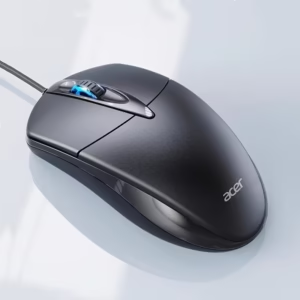
Our Top Pick: Acer Silent Wired Gaming Mouse (2025 Edition)
Quick Specs:
- Switches: Silent / Dampened (No Clicking Sound)
- Connection: Wired USB (No Latency)
- DPI: High Precision for Gaming
- Best For: Dorms, Late Night Gaming & Shared Offices
Description:
This mouse looks and performs like a gaming mouse but has one crucial difference: the buttons are nearly silent. It uses special dampened switches that remove the loud, sharp “CLICK” sound that can drive roommates or family members crazy. Unlike wireless silent mice, this is a wired model, which means you get the silent benefit without worrying about battery life or wireless lag during intense gaming sessions.
Pros:
- Completely Silent: Perfect if you game late at night and don’t want to disturb anyone.
- Zero Latency: Being wired, it offers a faster response time than budget wireless mice.
- Plug & Play: No drivers or batteries needed—just plug it in and start playing.
Cons:
- Tactile Feel: The silent switches feel “softer” than standard mechanical clicks, which takes a day or two to get used to.
- Wired: You are tethered to the computer.
Why it’s on this list:
This is the niche choice for quiet environments. If you share a room, live in a dorm, or just get annoyed by your own clicking, a silent gaming mouse is an incredible invention.
5. The XL Gaming Desk Mat
Our Top Pick: Japanese “Black Wave” XL Gaming Mouse Pad

Quick Specs:
- Size: Extended XL (Covers Keyboard & Mouse)
- Material: Non-Slip Rubber Base
- Design: “Great Wave” (Black/White Aesthetic)
- Best For: Completing the Setup & Low DPI Gaming
Description:
A gaming mouse is only as good as the surface it’s on. Instead of a tiny, standard mouse pad that you constantly slip off of, this “Extended” XL mat covers your entire desk area. It sits under both your keyboard and mouse, providing a unified, non-slip surface. The “Black Wave” design is a massive trend in the gaming community, adding a clean, monochrome aesthetic to your setup without looking too flashy.
Pros:
- Unlimited Mouse Space: You never run out of room, even when making big swipes in low-DPI shooters.
- Aesthetic Upgrade: Instantly makes a messy desk look organized and “pro.”
- Comfort: Provides a soft cushion for your wrists while typing or gaming.
Cons:
- Size: You need a desk wide enough to accommodate it (check measurements!).
- Cleaning: Fabric mats can collect dust and need to be wiped down occasionally.
Why it’s on this list:
This isn’t a mouse, but it’s the most essential upgrade for your mouse. It maximizes the performance of your sensor and protects your desk, all for an incredibly low price.
My Final Recommendation
For the person looking for the best all-rounder, my top recommendation is The Ultra-Lightweight Mouse (Acer Shadow Knight).
While the wireless options offer freedom and the Logitech G502 is a beast for productivity, the Acer Shadow Knight hits that sweet spot of “pure performance” for the price. The weight reduction gives you a genuine advantage in aiming speed, and since it’s wired, you never have to worry about charging it mid-game. It’s the single biggest “bang for your buck” upgrade you can make, and at this price, it’s a no-brainer.

Joakim (A.K.A 'JBH85') is the founder and editor of TopGadgetGuide.net, a site dedicated to simplifying tech and gadget guides. He conducts deep research and careful curation to bring you honest, unbiased, and easy-to-understand recommendations. His goal is to help you buy with complete confidence.
(Want to know exactly how he works? Read his full 'Review Process' here.)