
Searching for a high-quality Temu gaming mouse that won’t lag or break your budget? Finding a reliable Temu mouse for competitive play can feel like a gamble with so many cheap knock-offs out there. We’ve researched and compared the best budget gaming mice on Temu that actually deliver precision sensors, ergonomic designs, and lightning-fast response times.
(Want to know how I review my gadgets? Read my full review process here.)
Comparison Table (Top 3 Picks)
| Product Image | Product Name | Best for | Our Rating (out of 5) | Shop Now |
 | The Ultra-Lightweight Mouse | FPS & Fast-Paced Games | 4.7 / 5 |  |
 | The Budget Wireless Mouse | Casual, Cord-Free Gaming | 4.5 / 5 | |
 | The Multi-Button “MMO” Mouse | MMOs & Productivity | 4.4 / 5 | |
Detailed Product Reviews
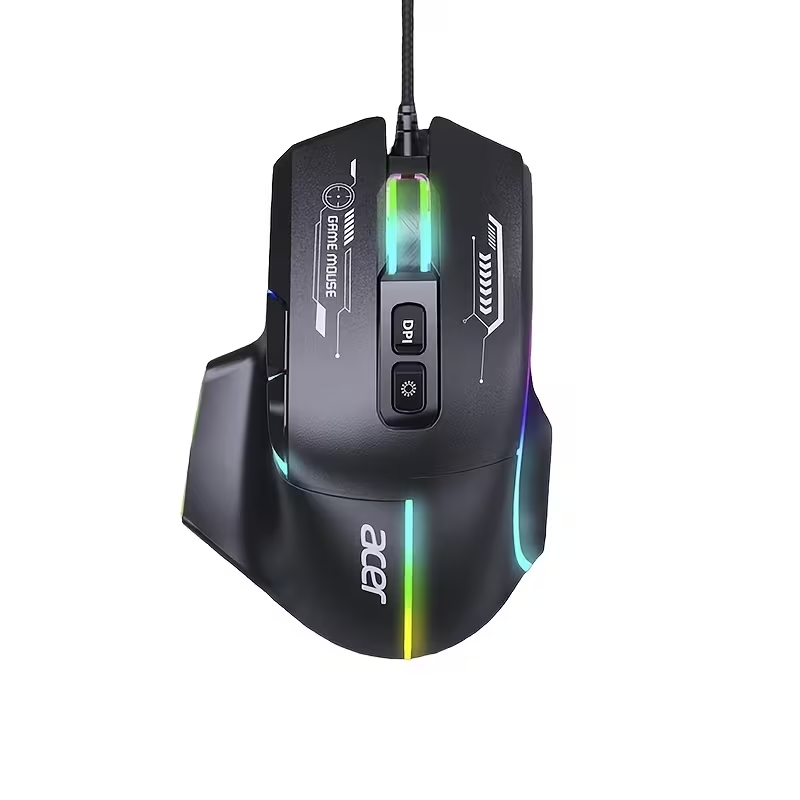
1. Acer OMW950 Wired Gaming Mouse
Our Top Pick: Acer OMW950 Wired Gaming Mouse

Quick Specs:
- Sensor: Optical Gaming Sensor (Up to 7200 DPI)
- Performance: 1000Hz polling rate for zero-lag inputs
- Design: Solid ergonomic shell with 7 programmable buttons
Description:
This is the perfect entry point for competitive gaming. While many lightweight mice use a honeycomb shell with holes to reduce weight, the Acer OMW950 achieves a nimble feel with a solid, low-profile ergonomic design. This is preferred by gamers who find honeycomb mice uncomfortable or hard to clean. It features dynamic RGB lighting and a highly precise sensor that handles fast aiming movements significantly better than a standard office mouse.
Pros:
- Solid shell prevents dirt and dust from getting trapped inside the body.
- Incredible price-to-performance ratio with features built for Battle Royale and FPS games.
- Dedicated DPI and macro buttons let you customize your sensitivity mid-game.
Cons:
- Wired design means you have to manage a cable on your desk.
- The sensor is excellent for beginners but lacks the extreme tracking of a $100 professional mouse.
Why it’s on this list:
This is the best choice for FPS and competitive players on a strict budget. It strips away unnecessary gimmicks to deliver a solid, lightweight aiming experience. To keep the sensor free of dust and debris for maximum precision, we recommend pairing it with one of [The 5 Best Air Dusters on Amazon].
2. The Budget Wireless Mouse
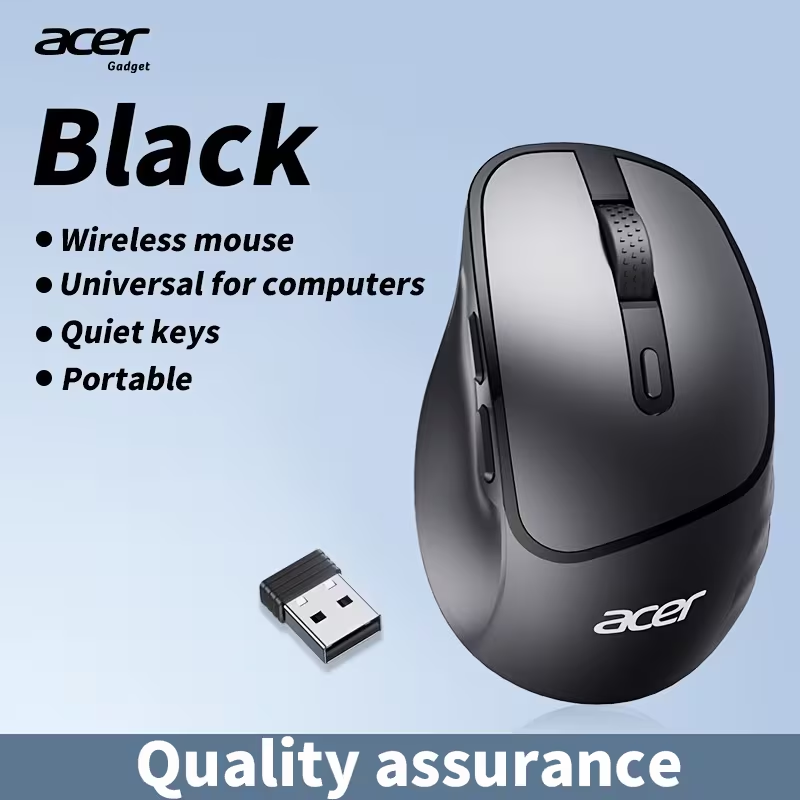
Our Top Pick: Acer Wireless Gaming Mouse (Low Latency Edition)
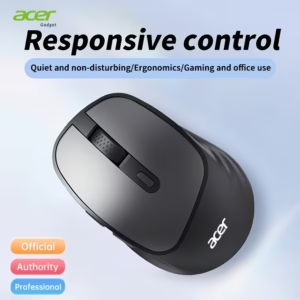
Quick Specs:
- Connection: 2.4Ghz Wireless (USB Dongle)
- Buttons: 6 Buttons (Including Side Buttons)
- Feature: Silent Click & Low Latency Mode
- Best For: Clean Desk Setups & Casual Gaming
Description:
This category is all about cutting the cord without breaking the bank. The Acer Wireless Mouse uses a dedicated 2.4Ghz USB dongle to provide a lag-free connection, far superior to standard Bluetooth office mice. It features a sculpted ergonomic shape for right-handed users and, crucially, includes two thumb buttons on the side—a must-have for gaming shortcuts. It also sports “silent switches,” making it perfect for late-night gaming sessions in a shared dorm or apartment. If your laptop has limited ports for the USB dongle, consider grabbing a compact [The 5 Best USB Adapters] to keep your other peripherals connected.
Pros:
- Total Freedom: No cable drag makes aiming feel smoother and keeps your desk looking incredibly clean.
- Gaming Features: Unlike basic wireless mice, this includes side buttons and a DPI adjustment button.
- Brand Reliability: Being an Acer product, the build quality is generally a step up from generic unbranded alternatives.
Cons:
- Battery: It uses disposable batteries (usually AA), so you need to keep spares handy.
- Weight: Batteries add weight, making it heavier than the wired “Ultra-Lightweight” options.
Why it’s on this list:
This is the best choice for casual gamers and anyone who hates cable clutter. It gives you the full gaming mouse utility (side buttons, adjustable DPI) with the freedom of wireless, at an unbeatable price point.
3. The Multi-Button “MMO” Mouse
Our Top Pick: Logitech G502 Hero (High Performance)

Quick Specs:
- Buttons: 11 Programmable Buttons
- Sensor: HERO 25K (Pro Grade)
- Feature: Infinite Scroll Wheel & Adjustable Weights
- Best For: MMOs, Strategy & Productivity
Description:
This is arguably the most famous gaming mouse in the world, and finding it on Temu at this price is a steal. While it doesn’t have the “keypad” of 12 side buttons found on niche MMO mice, the G502 offers 11 fully programmable buttons placed strategically around the grip. This allows you to bind complex macros, spells, or healing items to your mouse hand. It also features the famous “Infinite Scroll Wheel” which can be unlocked to spin freely—perfect for scrolling through long inventories or documents.
Pros:
- Massive Customization: With 11 buttons, you have total control over your abilities without needing to contort your hand on the keyboard.
- Sensor Quality: The HERO 25K sensor is flawless, offering pixel-perfect tracking that budget sensors can’t match.
- Weight System: Comes with small metal weights you can add or remove to adjust the feel of the mouse perfectly.
Cons:
- Heavy: This is a “brick” compared to the lightweight mice (Category 1). It’s built for stability, not speed.
- Wired: The thick braided cable is durable but can create drag if you don’t manage it well.
Why it’s on this list:
If you play MMOs (like WoW), MOBAs, or just want a mouse that can do everything, this is the king. Pair this macro-heavy mouse with a [The 5 Best Mechanical Keyboards on Temu] to give yourself total control over every spell and ability in the game.
4. The “Silent Click” Mouse
Our Top Pick: Acer Silent Wired Gaming Mouse (2025 Edition)
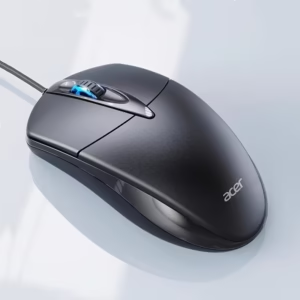
Quick Specs:
- Switches: Silent / Dampened (No Clicking Sound)
- Connection: Wired USB (No Latency)
- DPI: High Precision for Gaming
- Best For: Dorms, Late Night Gaming & Shared Offices
Description:
This mouse looks and performs like a gaming mouse but has one crucial difference: the buttons are nearly silent. It uses special dampened switches that remove the loud, sharp “CLICK” sound that can drive roommates or family members crazy. Unlike wireless silent mice, this is a wired model, which means you get the silent benefit without worrying about battery life or wireless lag during intense gaming sessions.
Pros:
- Completely Silent: Perfect if you game late at night and don’t want to disturb anyone.
- Zero Latency: Being wired, it offers a faster response time than budget wireless mice.
- Plug & Play: No drivers or batteries needed—just plug it in and start playing.
Cons:
- Tactile Feel: The silent switches feel “softer” than standard mechanical clicks, which takes a day or two to get used to.
- Wired: You are tethered to the computer.
Why it’s on this list:
This is the niche choice for quiet environments. If you share a room, live in a dorm, or just get annoyed by your own clicking, a silent gaming mouse is an incredible invention.
5. XL Gaming Desk Mat
Our Top Pick: Japanese Ukiyo-E Black Wave XL Mouse Pad

Quick Specs:
- Size: Extended XL (80 x 30 cm)
- Material: Non-slip rubber base with a smooth cloth surface
- Design: Monochrome Japanese Great Wave aesthetic
Description:
A gaming mouse is only as good as the surface it glides on. Instead of a tiny standard pad that you constantly slip off of, this extended XL mat covers your primary desk area. It sits securely under both your keyboard and mouse, providing a unified, non-slip tracking surface. The monochrome wave design is a massive trend in the gaming community, adding a clean, aesthetic look to your setup without being overly flashy.
Pros:
- Unlimited mouse space prevents the mouse from falling off the edge during low-DPI gameplay.
- Instantly makes a messy desk look organized and visually striking.
- Soft surface provides excellent wrist comfort during long sessions.
Cons:
- Requires a desk wide enough to accommodate the 80cm length.
- Cloth surface will eventually collect dust and requires occasional wiping down.
Why its on this list:
While not a mouse itself, it is the most essential upgrade for maximizing your sensor’s tracking performance and protecting your desk simultaneously, all for an incredibly low price.
My Final Recommendation
For the person looking for the best all-rounder, my top recommendation is The Ultra-Lightweight Mouse (Acer OMW950). While the wireless options offer total freedom and the Logitech G502 remains a beast for productivity, the Acer OMW950 hits that sweet spot of pure performance for the price. The solid ergonomic design combined with a high 1000Hz polling rate gives you a genuine advantage in tracking accuracy, and since it is wired, you never have to worry about charging it mid-game. It delivers the single biggest bang-for-your-buck upgrade you can make to your gaming setup, and at this price, it is an absolute no-brainer.

Joakim (A.K.A 'JBH85') is the founder and editor of TopGadgetGuide.net, a site dedicated to simplifying tech and gadget guides. He conducts deep research and careful curation to bring you honest, unbiased, and easy-to-understand recommendations. His goal is to help you buy with complete confidence.
(Want to know exactly how he works? Read his full 'Review Process' here.)